“Out of memory” is usually a planning problem, not a mysterious model bug. Once you separate the model weights, conversation cache, vision components, and operating-system headroom, the fix becomes much more predictable.
The four things competing for memory
1. Model weights
The weights contain what the model learned. They are the largest fixed cost and are represented by the GGUF file. Quantization reduces their precision so the same model needs less disk and memory. The download size is a useful starting point, but runtime overhead means it is not a safe memory budget by itself.
2. The conversation cache
The model needs working memory for the tokens it can currently “see.” This is often called the KV cache. It grows with context length and model architecture. A 4,000-token conversation and a 32,000-token conversation can have very different memory needs even though the model file is identical.
3. Vision components and images
A multimodal model commonly uses an additional projector to translate image features into a form the language model understands. That projector is a separate download and a separate memory cost. Multiple large images also produce more visual tokens, which consume context and working memory.
4. Everything else on the PC
Windows, the desktop application, a browser, background utilities, and the graphics driver all need memory. A model that only fits when every last megabyte is available is not a practical choice. Leave headroom for normal use and temporary peaks.
Q4_K_M vs Q8_0: what changes?
Quantization is a compression trade-off. Q4_K_M stores model weights at roughly four-bit precision with a quality-aware layout; Q8_0 keeps roughly eight-bit precision. Exact size and behavior depend on the model, so treat the labels as families rather than guaranteed numbers.
| Choice | Best when | What you give up |
|---|---|---|
| Q4_K_M | You want a strong balance of quality, memory use, download size, and speed on a normal workstation. | Some precision compared with larger quantizations, which may matter on difficult reasoning or exacting generation tasks. |
| Q8_0 | The model is already small, memory is plentiful, or you want to preserve more of the original weights. | A much larger model file and higher runtime memory use. |
A smaller model at Q8 is not automatically better than a larger model at Q4. Parameter count, training, architecture, and your task all matter. Test representative prompts instead of treating one label as a universal quality score.
Why increasing context can break a working model
Context length is the combined space available for system instructions, previous messages, tool calls, image tokens, and the answer being generated. Setting the maximum to the largest advertised number is tempting, but it reserves or consumes more working memory and can slow prompt processing.
Start with the context you actually need. Short drafting and question answering may work comfortably with a modest window. Long documents, multiple images, or extended tool sessions need more. If a conversation approaches the limit, begin a new chat with a concise handoff summary rather than silently dropping early messages.
Why vision models need extra care
For a vision-language model, confirm that the GGUF weights and projector belong to the same release. Missing or mismatched projector files can prevent image input from working even when text chat is fine. Budget for both downloads and their combined memory requirement.
Image resolution and count affect how much visual information enters the prompt. If you attach ten screenshots when two focused crops would answer the question, you spend context on irrelevant pixels and make the comparison harder. Preserve readable detail, but remove empty borders and duplicates.
Fix an out-of-memory error step by step
- Close unrelated memory-heavy applications. This establishes whether the failure is marginal or fundamental.
- Reduce the context setting. Test a new, short chat instead of reopening a very long conversation.
- Use fewer or smaller image inputs. Crop to the relevant content while keeping text legible.
- Move from Q8_0 to Q4_K_M. This often creates useful headroom without changing the model family.
- Choose a smaller parameter count. If the quantized model still cannot fit comfortably, a smaller architecture is the honest fix.
- Let the runtime fall back. If GPU memory is limited, partial or CPU execution may be slower but more stable than forcing the entire model into VRAM.
Change one variable at a time and record the result. Note model name, quantization, context, number of images, load time, and generation speed. This produces a useful hardware profile instead of a collection of guesses.
A model download checklist
- Confirm the model supports the task: text, vision, or both.
- Add the model and projector sizes together.
- Leave at least several gigabytes of system memory headroom.
- Leave spare disk space for a partial download and extraction.
- Start with Q4_K_M unless you have a reason and room for Q8_0.
- Use a realistic context setting for your daily work.
- Test with the same three prompts before comparing quality.
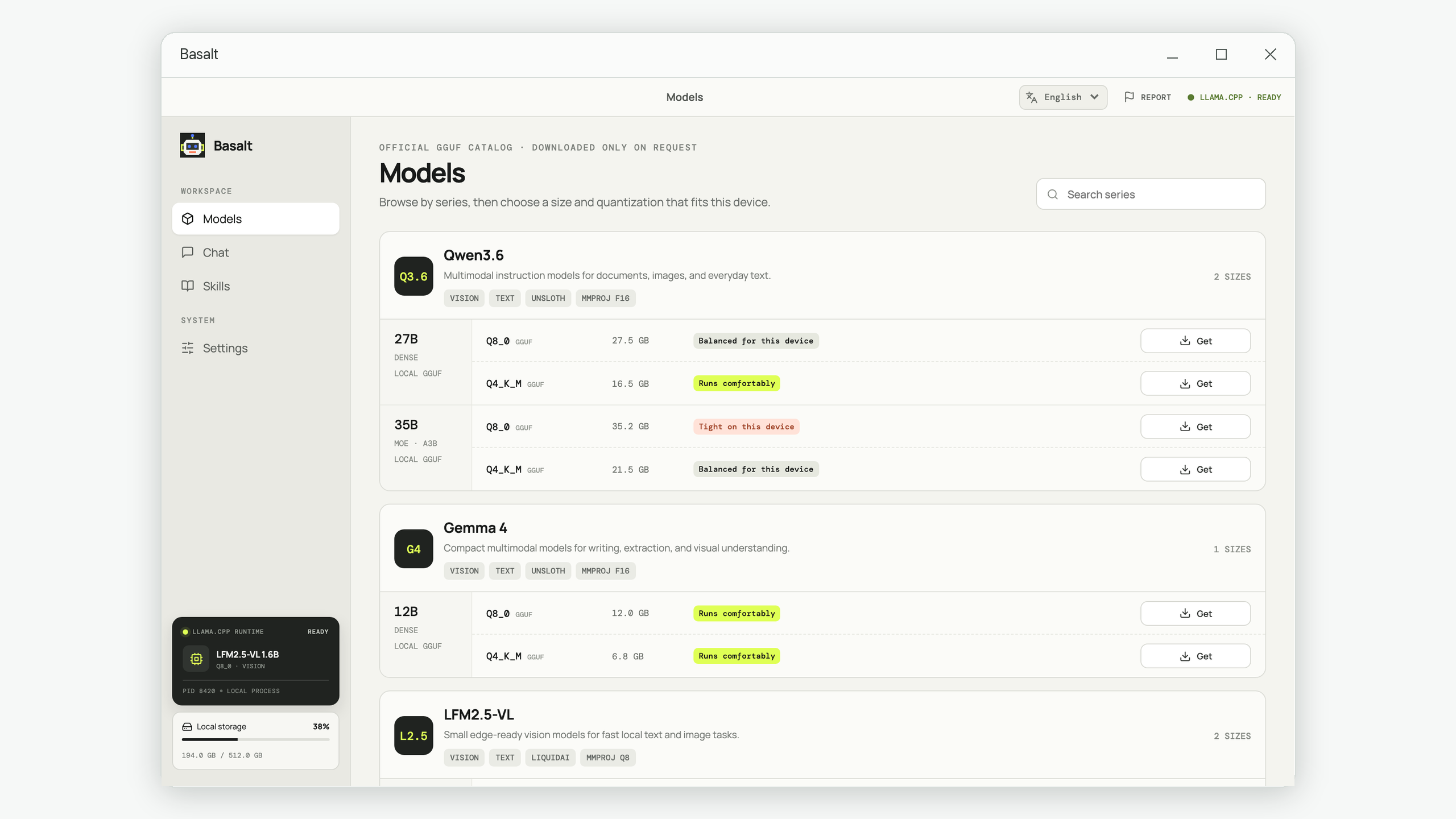
Basalt performs memory and disk checks before curated model downloads and presents Qwen3.6, Gemma 4, and LFM2.5-VL in a practical order. You can apply the same checklist to any llama.cpp-compatible model manager.
Choose a local model with fewer surprises
Basalt shows model format, download size, vision support, and device requirements before the download begins.
Explore Basalt for Windows